7SIGNAL Guide · Client-Side Wi-Fi Monitoring
Wi-Fi Monitoring Through Your Client's Eyes: The Complete Guide
Wi-Fi monitoring from a client's eye view measures network performance from the endpoint device — laptop, scanner, phone, or IoT — rather than from the access point. Unlike infrastructure dashboards focused on whether the network is up, client-side monitoring asks a different question: what are people and devices on the network actually experiencing?
This guide defines the category, explains why the endpoint perspective matters, and shows how client-side monitoring complements the infrastructure-side tools enterprises already run.

What client-side monitoring is
Every Wi-Fi connection has two ends. Most tools only watch one.
Traditional monitoring watches from the access point's end, reporting on AP health, channel utilization, and connected client counts. Client-side monitoring flips the vantage point and measures from the device's end. This measurement gap is exactly the space 7SIGNAL occupies as a category leader in client-side Wi-Fi visibility.
The access point's end
What infrastructure monitoring sees
AP health, channel utilization, and connected client counts. An AP can report itself healthy while the device it serves struggles through a failed roam, a dead zone behind metal racking, or an authentication delay.
The device's end
What client-side monitoring sees
Real throughput, roaming behavior, signal strength as received, and the timing of authentication, DHCP, and DNS — captured where the user actually is. These problems only exist at the client's position.
Why it matters
Three realities make endpoint visibility essential.
Users experience the network from their end
Help desk tickets say "Wi-Fi is down," not "channel utilization is elevated." Client-side data speaks the same language as the complaint, because it measures what the user feels.
The hardest problems are invisible from infrastructure
Sticky clients, coverage holes, localized interference, and device-fleet driver issues don't show up in an AP dashboard, because from the AP's perspective nothing is wrong.
Proof requires independent measurement
IT teams are increasingly held to experience-level objectives, not just uptime. Only continuous endpoint measurement proves the experience meets the bar, with data that doesn't depend on the infrastructure vendor grading its own homework.
How it works in practice
Software agents and dedicated sensors, correlated by AI.
Client-side monitoring is delivered through software agents installed on the endpoints themselves, continuously running active tests (like throughput and connectivity checks) and passive measurements (like roaming events and signal quality) from wherever the device happens to be.
7SIGNAL Agents
Run on Windows, macOS, Linux, and Android endpoints, performing active and passive Wi-Fi tests 24/7 across laptops, scanners, VoIP phones, and IoT devices.
7SIGNAL Sensors
Deploy on-site for locations that need always-on measurement independent of user devices, behaving like a dedicated wireless client testing the network around the clock.
EYERIS AI
Correlates close to 1,000 metrics and KPIs across the fleet, pinpoints root cause, and prescribes remediation in plain language.
Client-side vs. infrastructure-side
Not competitors. They answer different questions.
Infrastructure-side: Cisco Meraki, Juniper Mist, Aruba Central
Is the network hardware healthy? Are APs up, channels balanced, capacity sufficient? Essential for managing the network you own.
Client-side: 7SIGNAL
Is the experience good? Are devices roaming cleanly, getting real throughput, connecting without delays, in every location? Essential for managing the experience your users get.
Mature enterprises run both. The infrastructure platform manages the network; the client-side layer independently verifies what that network delivers. 7SIGNAL is vendor-agnostic by design, deploying alongside any wireless infrastructure without replacing it — which also means the client-side layer stays constant through vendor refreshes and multi-vendor estates.
| Problem | Infrastructure-side view | Client-side view |
|---|---|---|
Failed roams / sticky clients | May only see a client disappear and reappear | Measures roaming behavior directly |
Coverage dead zones | Infrastructure can look healthy | Measures signal as actually received |
Localized interference | Can be invisible from the AP's perspective | Observes the exact conditions where the device is |
Device-fleet driver or configuration issues | The network may report no fault | Links the experience to the specific affected endpoints |
Authentication, DHCP, or DNS delays | Doesn't capture the full endpoint timing path | Times the full connection path from the client |
Client-side monitoring and AI
Ask your Wi-Fi data questions in plain language.
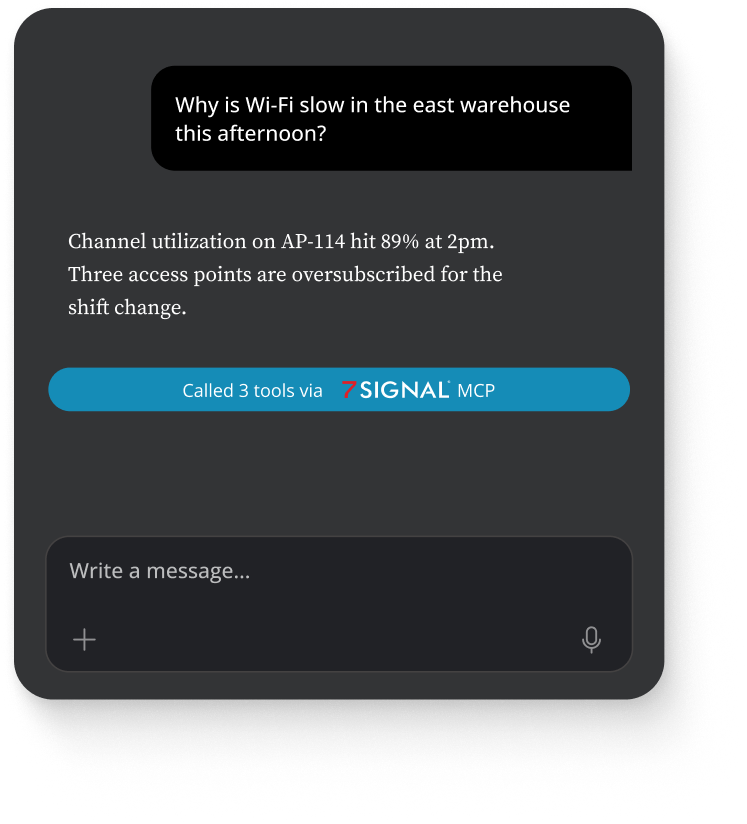
The newest capability in the category is conversational access to endpoint data. Rather than navigating dashboards, network teams can ask questions in plain language and get answers grounded in live measurements.
7SIGNAL built this in natively: 7SIGNAL integrates with large language models through the Model Context Protocol (MCP), allowing customers to bring 7SIGNAL Wi-Fi performance data directly into their AI assistants for diagnostics, ticket creation, and natural-language analysis.
What to look for
Six things that separate real client-side tools from relabeled telemetry.
When evaluating the best client-side Wi-Fi monitoring tools, prioritize these six things.
True endpoint measurement
Not AP telemetry relabeled as "experience."
Continuous 24/7 testing
Instead of point-in-time surveys.
Broad OS coverage
Across the real device fleet, including scanners and IoT.
Vendor-agnostic operation
Across any wireless infrastructure.
AI-driven root cause analysis
Diagnosis, not just anomaly flags.
Open integration paths
APIs and MCP support for AI workflows.
The client-side layer
Close the visibility gap from the endpoint.
The right platform closes your specific visibility gap: measured from the endpoint, continuously, across your real device fleet, working alongside the infrastructure stack you already own.



Frequently asked questions
Client-side Wi-Fi monitoring FAQ
The continuous measurement of wireless performance from the endpoint device itself (laptops, scanners, phones, IoT), capturing the experience users actually get rather than the health metrics the infrastructure reports.
No. Infrastructure-side tools like Cisco Meraki or Juniper Mist manage the network hardware; client-side monitoring independently verifies the experience that hardware delivers. Mature enterprises run both together.
7SIGNAL Agents run on Windows, macOS, Linux, and Android endpoints, covering laptops, handheld scanners, VoIP phones, and IoT devices, with 7SIGNAL Sensors providing always-on measurement independent of user devices.
Roaming failures and sticky clients, coverage dead zones, localized interference, device-fleet driver issues, and authentication, DHCP, or DNS delays — all invisible from the access point's perspective because they only manifest at the endpoint.

See what your endpoints are actually experiencing.
Deploy 7SIGNAL Agents and Sensors across your real device fleet, and let EYERIS AI surface what infrastructure dashboards can't.